Virtual Number for WhatsApp: Why It’s Vital for Businesses?
Are you willing to use your WhatsApp number for your business without showing the same to all? Virtual number is the answer for it. With this virtual number for WhatsApp, you can protect your privacy. You can keep your professional and personal chats separate completely.
This blog gives an idea about what is virtual WhatsApp number and how it works and how to use the same for your business and its need with reasons.
So, let’s roll it down further here.
What Is Virtual Number for WhatsApp?
A virtual number for WhatsApp is a phone number offered by a virtual telecom or VoIP service. It does not require a physical SIM card for your device, but it must be receivable of incoming SMS or voice calls for WhatsApp verification.
With a virtual phone, sales agents can maintain independent public and private chats, safeguard their personal privacy and sustain a professional relationship with clients.
After the setup is done, you don’t need an extra phone for daily use, but one device is required to register and verify the virtual number. It’s good for maintaining personal and business chats separate or multiple accounts management.
Virtual numbers are helpful to those businesses, which are running on WhatsApp Business API.
The API allows companies to manage high volumes of messages, offer automated replies, and incorporate WhatsApp with CRM tools.
For businesses offering support, marketing, or big volumes of messaging, a virtual number is required. It allows teams to work from multiple devices and at the same time, keeping personal numbers private and business chats well organized.
Virtual numbers operate like regular numbers for WhatsApp verification and messaging, but some could not support calls or all OTP services.
Enhance your customer engagement with WhatsApp Marketing platform
Control conversations and reply instantly
Main Reasons to Prefer a Virtual WhatsApp Number
A virtual WhatsApp number is a wise choice for businesses looking to prefer efficient and professional business communication.
Many businesses get a local number to make local customers feel more comfortable, while others try overseas virtual numbers to reach out to overseas audiences.
You can control multiple virtual WhatsApp numbers, but the proper limit depends on your Business Solution Provider (BSP) and Meta’s verification model.
WhatsApp Business API accounts are verified for each business entity. Each service provider declares its own restrictions, mostly allowing 5–10 numbers for a business, relying on the verification level.
For big setups, verified businesses can request for more limits from Meta, allowing them to allocate different numbers to teams, departments, or regions and managing all from a single dashboard.
This setup permits you to upgrade or grow communication, route messages efficiently, and retain a clear view of customer interactions, maintaining your business manage and responsive.
Find below 5 key advantages highlighting its position as a top option.
1. Team Communication
A virtual number makes team collaboration very easy. Rather than forwarding messages or sharing a phone, various agents can access the account with the use of API-based shared inboxes.
They may respond to customer queries, stay aware about chats, and manage communications without mixing of your personal and professional chats.
If you’re using the WhatsApp Business App instead of the WhatsApp Business API, you can connect to 5 devices per account, enabling a small team to manage messages together.
For big teams, the WhatsApp Business API with a shared inbox gives unlimited agent access virtually and latest collaboration features.
In a salon chain, every branch or stylist can manage appointment bookings and client questions directly via the shared number, making sure for smooth coordination and regular communication across all locations.
2. Personalized Customer Experience
With a (fixed)dedicated virtual WhatsApp number, you can reply to messages quickly and provide solutions customised to every customer’s needs. It supports you build trust and make a professional image, which makes customers feel ‘valued’ and more likely to be with your brand more.
A fitness gymnasium may apply the virtual number to send personalized workout plans, class schedules, or membership alerts to each member, making more engaging and customised experience.
3. Keep Private Your Personal Number
A virtual number hides your personal number when you are communicating with customers. In this way, you protect your personal space at the same time, offering smooth support. It’s useful, if you wish to avoid unwanted calls or texts other than the work.
4. Derive Results from Your Marketing Efforts
Use of a virtual WhatsApp number allows businesses to measure and improve their messaging performance. While the WhatsApp Business App gives limited insights, the WhatsApp Business API allows you to access complete analytics via BSP dashboards.
With these dashboards, you can track metrics i.e. message delivery, reply rates, conversation trends, and campaign performance.
Integration of such kind of metrics with your CRM allows audience segmentation, A/B testing, and perfect ROI tracking.
5. Reach More Customers, Anywhere
A virtual WhatsApp number gives your business convenience. With the WhatsApp Business API, your number is not fixed to a single device, allowing teams to access it from anywhere.
For WhatsApp Business App users, the number remains linked to a primary phone till multi-device support is allowed. Either way, a virtual number keeps it simple to scale operations and grow your customer base without any extra issue.
For a small business or globally expanding SaaS brand, a virtual WhatsApp number allows you to connect with customers in various countries without needing local offices. It makes sure that your business team can offer timely support and updates anywhere, helping you expand operations efficiently.
Upgrade your messaging with trusted WhatsApp Business API Tools
Automate replies, manage high volume messages
Know Your Virtual Number for WhatsApp
Setting up a virtual number for WhatsApp is easy than it sounds. You don’t need to be technical savvy. Anyhow, it’s important to know that some countries could have regulations around virtual numbers or business messaging.
Once your number is ready and compliant, it can support you communicate better with customers and grow your business.
Here’s how you can start.
Step 1: Select a Virtual Phone Number Provider
Select a WhatsApp-approved provider or BSP supporting numbers eligible for SMS/voice verification during setup.
A basic provider will only give you the number (good enough for small setups).
But if you want to organise customers at higher scale, search for a partner who also supports WhatsApp Business features, provides customer support, and makes sure for the smooth onboarding.
Step 2: Register and Select Your Number
After selecting a provider:
Make an Account: Sign up on the provider’s platform by submitting your business details and the necessary documents to verify your business identity.
Choose a Number: Select a virtual number aligning with your business’s target market.
Buy the number: Buy the virtual number use a convenient online payment option, like a credit card or PayPal.
Step 3: Verification of the Virtual Number
WhatsApp will pass on a 6-digit verification code via SMS or voice call.
For WhatsApp Business App users: Give the code directly within the app to fulfil the verification process.
For WhatsApp Business API users: Input the verification code via your BSP’s platform to finalize the setup.
Now as everything is set, you can initiate with the use of your virtual number to send out transactional messages, answering of the queries, and run marketing campaigns.
Either it’s sending of order confirmation updates, replies to customer questions, or sharing of new offers, your virtual number helps you to stay connected without sharing your personal details and number.
Who Benefits from a Virtual WhatsApp Number Setup?
A virtual WhatsApp number is not just for big organizations. It’s helpful for all types of businesses and professionals.
Either you are starting just now or already controlling a large team, find here how different users can gain the benefits.
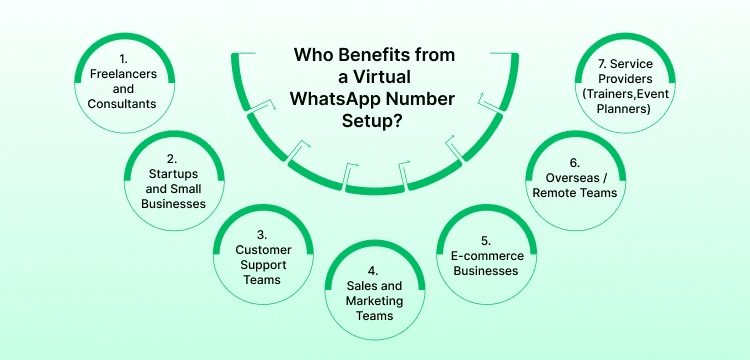
1. Freelancers and Consultants
If you work solely, a virtual number supports you keep your personal and client conversations separate. It also gives you a more professional appearance without having to share your private number.
2. Startups and Small Businesses
Startups mostly have limited resources. A virtual WhatsApp number makes it easy to control customer queries without buying extra phones or devices. You can stay organized while growing your operations.
3. Customer Support Teams
Teams handling a lot of customer requests can apply a shared virtual number to collaborate easy. Multiple agents can access the same account, making sure for quick responses and smooth communication.
4. Sales and Marketing Teams
Marketing teams may utilise virtual numbers to run their campaigns and promotions without disturbing their personal contacts. It helps to track replies, collect customer feedback, and check out parameters of campaign success.
5. E-commerce Businesses
For e-commerce stores, being present on WhatsApp may boost customer trust. A virtual number allows you to handle order updates, shipping details, and support requests smoothly while keeping operations simplified.
6. Overseas / Remote Teams
If your team or customers are scattered across many cities or countries, a virtual number for WhatsApp allows you to communicate easily without any worry about roaming charges / location barriers. It’s a money-saving way to stay connected globally.
7. Service Providers (Trainers, Coaches and Event Planners)
Professionals offering services to clients can enjoy benefits for using a fixed allotted WhatsApp number. It helps in scheduling, sending alerts, and offering personalized advice while not intervening in the privacy.
Simplify reservations with a smart AI Booking Assistant
Let customers book, confirm, and manage appointments instantly
How WebMaxy Helps?
WebMaxy allows you to run your WhatsApp business communication on a virtual number. You are not bonded with a numbered fix SIM anymore. Once it’s done, your team would handle all chats from a shared dashboard. There is no need of passing around devices or missing messages. You can reply, automate most common responses, assign chats to the right team members, and run the campaigns or follow-ups easily.
It simply brings all things into one place. That makes well organised customer communication, in responsive tone, and easy for management as you grow.
Conclusion
With a virtual number for WhatsApp supports you to stay well organized, professional, and connected with your customers. Either you are a freelancer, an entrepreneur, or part of a customer support team, it allows you to manage your communication better and retains your personal information private.
Here, as of now we have aware about the WhatsApp Virtual Number and how it works as well as its importance, to take further steps is very important. You must prefer a service provider, go through the verification process, and to use your virtual number for communication.
If you want to use and access features like WhatsApp automation, team management, chatbots etc. Use of the WhatsApp Business API with your virtual number will improve your customer communication.
For more details, you can contact our WebMaxy team via email on: info@webmaxy.co
Frequently Asked Questions

Adam Wilson
Adam Wilson comes with an experience of 12+ years in the IT industry. As a Customer Success Manager, he has been researching and trying to understand the customers’ behavior in different scenarios. He has also studied human psychology to relate it to the purchase journey of the customers. His published books on customer psychology and behavior have received many honors and awards from various enterprises.