WhatsApp Broadcast vs Group: The Complete Business Guide
WhatsApp is known for the comfort and usefulness for business communications as well as personal chats. Everyone uses this app today. Also, WhatsApp Business App is used by many businesses across the world where they regularly get engaged with their customers and connect with them, promote their products and services to drive sales. WhatsApp Groups and WhatsApp broadcast are the 2 vital features of WhatsApp. In this blog article, we are going to explain the difference between the WhatsApp broadcast vs group and how fantastically we are going to utilize them.
- Which are the Methods to Use WhatsApp Groups?
- What is the Concept of WhatsApp Broadcast?
- WhatsApp Broadcast vs Group
- How to Make and Send a WhatsApp Broadcast List?
- What are the Advantages of WhatsApp Broadcast?
- When to Use WhatsApp Broadcast vs Group?
- How Businesses Can Use WhatsApp Broadcast?
- WhatsApp Broadcast or WhatsApp Group: Which One Should You Use?
- Conclusion
- Frequently Asked Questions
WhatsApp Group: The Concept
WhatsApp group is a two-way communication feature where group members of same interest or criteria can chat with one another without any issues. Users from a group may share images, videos and important information with one another. The feature becomes easy and transformative when you need to share the same piece of information with many people.
How to Make a WhatsApp Group?
3 fast steps to make WhatsApp groups:
- Open WhatsApp > Chat Tabs > New Chat
- Select New Group > Add Contacts
- Name Group > Create
And your WhatsApp Group! Now, you have made a WhatsApp group. You can now start to chat with the group participants from the group and distribute on messages, photos, videos, documents etc.
Which are the Methods to Use WhatsApp Groups?
1. Keep in Touch: Groups let you connect with people. It’s simple to stay updated with friends and family by starting a group. Share news, photos, videos, and make plans.
2. Teamwork: Use Groups for projects to share ideas, send files, and keep things on track.
3. Share Interests: Groups are a place to talk about topics, share info, set up events, and help each other with interests.
With the effective use of WhatsApp groups, you can offer communication, collaboration, and engagement within various areas of your life, either personal, professional, or community level.
Scale Up Your Marketing Reach Instantly
Send personalized updates to thousands of customers.
What is the Concept of WhatsApp Broadcast?
WhatsApp Broadcast is a one-way communication feature allowing you to send private messages to a selected group of people. It allows you to share photos, videos, information or location with friends, family or business contacts, customers etc.
To use WhatsApp broadcast: create a list, select your contacts, type your message, add attachments if you want, and send and ok!
With the vital WhatsApp feature- WhatsApp Business API you may send broadcast messages to 1000s of customers who have opted-in to receive messages from your business. The WhatsApp Business API enables you to manage all your customer communication chats smoothly with its ‘WhatsApp shared team inbox’ and share ‘product catalogues’ in large size via automated messages and many more.
WhatsApp Broadcast vs Group
The remarkable difference at WhatsApp Broadcast vs Group is that the broadcast has privacy over the group feature. Any message sent via the WhatsApp broadcast will be getting as a private message by the recipient.
Similarly, it will get in your private chats with the recipients. Let us refer the key differences between a WhatsApp Broadcast vs Group
1. Communication Mode
WhatsApp Broadcast allows users to send messages to various recipients without unlocking other recipients’ identities, suitable for mass announcements or promotions.
WhatsApp Group allows two-way communication among all members, motivating discussions, sharing media, and organizing events.
2. Scope of Reach
WhatsApp broadcast lists let you message many people. This is an edge for businesses or for the personal updates. WhatsApp groups work fantastically good for small teams, friends, families or communities because they permit only 256 people per group.
3. Privacy & Personalization
WhatsApp broadcast is private because messages go to each person individually. You can personalize messages without a group conversation feel. Where it has conditions to join or leave the broadcast list.
WhatsApp groups admins manage membership, permissions, and can enforce rules, making sure for smooth functioning and moderation.
How to Make and Send a WhatsApp Broadcast List?
Making a broadcast list on WhatsApp is straightforward.
Follow given easy steps to develop one:
1. Open WhatsApp and click on the given 3 dots appearing on the top right-hand corner of your screen.
2. Click on New broadcast
3. Choose the contacts you want to send the broadcast message too
4. Click the green checkmark to successfully make your broadcast list
5. Type out your message and hit the send button.
Irrespective of which of the 2 features you decide to go with, remember to always to be ethical and skipping from spamming your customers. It will only have impact on your business and brand. If you are serious to use the broadcast messaging feature, there are available options for WhatsApp Business API users also.
What are the Advantages of WhatsApp Broadcast?
Check out these topmost benefits of WhatsApp broadcast group:
1. Information Sharing with Many People
WhatsApp business account broadcasting supports you better in your WhatsApp customer service by enabling you to send the same message to various customers at one click while making it looks like ‘personalised’ sent to every recipient. In other words, the broadcasted message will arrive as an individual sent a message in your personalised chats.
2. Send Notifications/ Alerts
The reality about WhatsApp Business broadcast is that all the contacts selected by you will get the same message without any need for you to send it to every one of them.
3. The Marketing Tool
With this feature you can promote your products, services and interact with your customers at a larger scale. The contact number of your customers and a well-defined business strategy are the only 2 things needed. People need not to know if they have been added in a list.
Also, they would be unknown that they are a contact within a WhatsApp business broadcast list. The feature does not inform them at all.
Build a High-Engagement Community Space
Inspire direct conversations and give rapid support to users
When to Use WhatsApp Broadcast vs Group?
This is very interesting to know which feature is to be used as tool for your suitable business goal or objective.
For businesses, every type of communication is not self-sufficient, at all. WhatsApp broadcast vs group is based on your end objectives, audience, and the type of communication you want to inspire.
Here is a systematic approach to support you to get- which tool is best for various business situations.
1. When to Use WhatsApp Broadcast
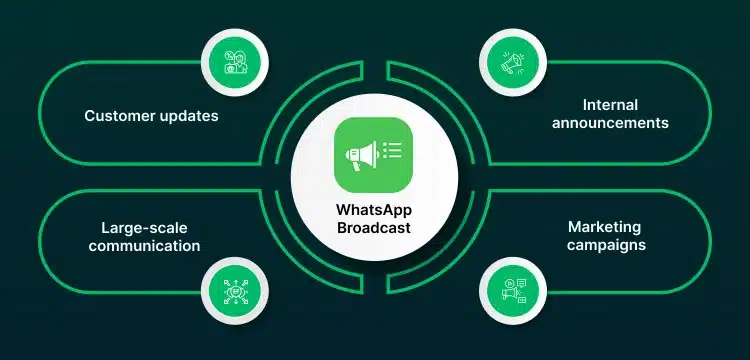
You may use WhatsApp broadcasts when you must share information quick and smartly with a target audience without initiating a conversation.
Best Suitable Situations:
- Customer Updates: Send out offers, appointment reminders, service alerts to certain customer segments.
- Internal Announcements: Share company-wide notices where responds are not required.
- Marketing Campaigns: Reach contacts without revealing others’ information.
- Large-Scale Communication: Either you require to send messages over the 256-contact limit, the WhatsApp Business API enables you to boost broadcasts across large customer bases while retaining compliance and individualization.
2. When to Use WhatsApp Group
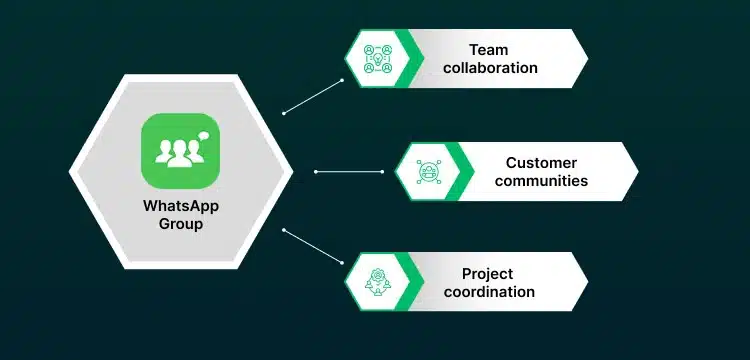
Groups are ideal when you want to chat, collaborate, or open discussions where participants would exchange ideas and give real time feedback.
Best Suitable Situations:
- Team collaboration: Ask questions, share files and align tasks within internal teams.
- Customer communities: Help forums, user groups, or discussion boards where customers get engaged and helping each other.
- Project coordination: Ongoing conversations requiring input from various participants.
How Businesses Can Use WhatsApp Broadcast?
WhatsApp broadcasts are made to support you effectively communicate with larger level of audiences. Find below given key features and benefits making it a robust tool for customer engagement and updates.
1. Get a Larger Audience Without Issues
With WhatsApp broadcast, you may send important updates or product / services promotions to various contacts at once. So, you have not to control individual chats or worry about missing someone.
Use case: A retail brand introduces a weekend offer and needs to inform thousands of customers faster. By using a WhatsApp broadcast list, they share the offer rapidly with their complete customer base, saving hours of human outreach.
2. Save Time by Using Templates and Automation
WhatsApp Templates give you pre-write messages for common situations, and automation supports you sending them quickly and regularly. This gives time saving on routine chats so you can get on to high-value work.
Use case: An online education platform sends class schedules and event reminders using message templates. Automation makes sure that communications are timely and error-free, helping the team to focus on course development.
3. Keep Messages Professional and Personalised
WhatsApp broadcast messages are sent individually, so every recipient feels like the message was purely made for them. And privacy is fully protected since recipients can not see each other’s information.
Use case: A healthcare services provider gives appointment reminders to user patients. Each message is personal and customized, helping patients feel special and making sure about the information security with sensitivity.
4. Drive Customer Engagement
As broadcast messages are sent individually, they feel direct and professional without being overwhelming. When they are aligned with the WhatsApp Business API, you can add personalization via message templates and dynamic variables to create every message more suitable.
Use case: A travel agency shares destination tips and frequent on-time travel alerts before clients’ trips. Customers prefer the helpful information and are more likely to book tours or services because the messages are customized to their interests.
5. Ideal for Businesses of All Sizes
WhatsApp Broadcasts can be upscaled with your business, but with some limits. WhatsApp Business app, each broadcast list is only up to 256 contacts.
For larger audiences, businesses may switch to the WhatsApp Business API, which supports sending messages to Lakhs of customers while maintaining personalization and compliance.
Either you’re running a startup or a large company management stakeholder, you can use broadcasts to make customers informed, engaged, and supported without overwhelming your team.
Use case: A small sized e-commerce brand sends product updates to its old customers, and a multinational company shares quarterly reports with its stakeholders. WhatsApp Broadcasts make communication smooth at any scale.
Upgrade your Professional Presence and Efficiency
Unlock auto-replies, product catalogues, and detailed statistics
WhatsApp Broadcast or WhatsApp Group: Which One Should You Use?
With the below given guidelines you can decide on which one you need to use- WhatsApp Broadcast or WhatsApp Group?
| Question | If yes → Use Broadcast | If yes → Use Group |
| Do you want to send one-way messages? (updates, announcements/alerts, invites) | Yes | No |
| Is your goal personalized communication at scale? | Yes (With API recommended for larger communication volumes) | No |
| Do you need interaction, feedback, or collaboration? | No | Yes |
| Are you targeting internal teams, communities, or project discussions? | No | Yes |
| Is privacy or limited visibility important? | Yes | No |
Conclusion
As your customer base grows with WhatsApp marketing, depending on basic WhatsApp groups for communication may hamper the growth rate. One must act smarter. Use those WhatsApp tools helping you grow, stay smart, and maintain personalization without any extra complexity.
WebMaxy’s broadcast solution provides the same. Go ahead of simple groups and select a smart way to manage customer communication, making sure that you stay connected, compliant, and ready for any growth comes next. For more details and clarifications required, you can drop an email to our WebMaxy experts team on: info@webmaxy.co
Frequently Asked Questions
Yes. WhatsApp broadcast sends messages to recipients individually, appearing as a regular text from you. People won’t know who else got the same message. To send a WhatsApp broadcast, create a list and send your message. Consider that people will only get it, if they have saved your number in their contacts.
Think it in this way – WhatsApp Groups like team meetings, where each one shares thoughts and sees replies. Broadcast lists? They’re more like sending separate emails. You send one message, but each person gets it privately and replies only to you. Groups encourage group chats; broadcasts keep the focus between you and each person.
Yes, the WhatsApp Business API lets you send automated broadcasts, a key benefit over the standard Business app. By connecting to the API through a Business Solution Provider, companies can send many automated and messages that feel personal to customers who have opted in. You can also add photos, videos, and interactive buttons, which you can’t do with the free app.

Adam Wilson
Adam Wilson comes with an experience of 12+ years in the IT industry. As a Customer Success Manager, he has been researching and trying to understand the customers’ behavior in different scenarios. He has also studied human psychology to relate it to the purchase journey of the customers. His published books on customer psychology and behavior have received many honors and awards from various enterprises.